How to Refill, Transfer, or Start a New Prescription

Filling a prescription should feel simple and with the new Pharmacy Solutions RXLocal App it is!

Whether you are starting a new medication, moving one to us, or refilling something you already take, we have made every step easy to follow. 

Pharmacy Solutions has launched a state-of-the-art online pharmacy with a free and secure mobile app to help you manage your prescriptions right from your mobile phone. 

How RxLocal Works RxLocal is powered by PioneerRx, and connects you directly with Pharmacy Solutions. After you download the app and create your account, you can refill prescriptions with a single tap, message our pharmacists with questions, manage prescriptions for your whole family, and set reminders that help you stay informed. All messaging is HIPAA secure, so your information always stays private between you and Pharmacy Solutions.

How to Get Started

Checkbox Starting a new prescription.

Ask your provider to send your prescription to Pharmacy Solutions. Once we receive it, you can manage refills and messages through the RxLocal app. 

Checkbox Transferring a prescription.

If you currently use another pharmacy, we can move your prescription to Pharmacy Solutions for you. Contact our team with your prescription details and we will handle the transfer. 

Checkbox Refilling a prescription.

If Pharmacy Solutions already fills your prescription, you can request a refill in seconds through the RxLocal app. The steps are below.

Download the RxLocal App  First, download the free RxLocal app to your phone. Scan the code for your device, or search for RxLocal in the App Store or Google Play. 

Create Your Account  Once the app is installed, open it and follow these steps. Keep a recent prescription label handy, since your details will need to match the information Pharmacy Solutions has on file. 

Connect With Pharmacy Solutions

When you create your account, RxLocal connects you directly with Pharmacy Solutions, so your prescriptions are ready to manage from your phone. To confirm we are set as your pharmacy, you can search for Pharmacy Solutions in the RxLocal pharmacy finder and select us in Arlington, Texas.

How to Request a Refill  When you are ready for a refill, the app makes it quick. Just follow these steps. 

We Are Here to Help

Setting up a new app can feel like one more thing to setup, and you do not have to do it alone. If you have any questions about downloading RxLocal, creating your account, or moving a prescription to Pharmacy Solutions, our pharmacists get engaged and walk you through it. Reach out any time and we will help you get started.

ATTENTION!

YOUR FORM IS NOT SUBMITTED

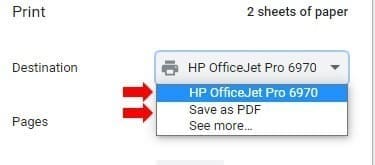
To submit your order, click the “PRINT/SAVE” button located under this pop-up. 

You can save the PDF to your computer to fax at a later date or print it now to fax immediately.  

Fax your order form to 817-860-6083 for processing.

Provider Access Required Create a provider account to view the full resource library, including the drug catalog, order forms and more.

New to Pharmacy Solutions? Register now

2 Ways to Explore

Educate Me

Get detailed information, research, and deeper product context.

Toggle on to see more educational content.

Explore Treatments

Keep things brief and see related products faster.

Toggle on to focus on products.